6. Updating Shopify Reporting for Multi Gift
Stop multi-gift orders double-counting in Shopify revenue reports: what the Cancel the main order setting does, and how to filter main orders out with the GNMG-Parent tag.
Written By Nick Kennedy
Last updated 22 days ago
On the free plan or Core? Multi Gift needs the Professional plan. Choose a plan in Settings > Subscription in the app, or email support@giftnote.com and we'll help you choose. Which plan do I need?
Each multi-gift order creates two kinds of order in Shopify:
- One main order, which takes the full payment
- One order per recipient, each carrying the revenue for that gift
Both show up in Shopify's reports, so your revenue can be counted twice. This article shows you how to leave the main order out.
Why it works this way: Shopify allows one payment per checkout, so the payment sits on the main order and the revenue is split across the recipient orders.
Let Giftnote cancel the main order
In Giftnote, go to Settings → Multi Gifts → Settings → Main order. With Cancel the main order once it's paid on (the default), Giftnote cancels the main order in Shopify once payment is confirmed. It doesn't restock, because your recipient orders ship from that stock.
If the payment is invoiced or authorised but not yet captured, the main order stays open until the payment settles.
Cancelling the main order doesn't always keep it out of your Shopify reports, so add the report filter below as well.
Filter the main order out of your reports
Giftnote tags every main order GNMG-Parent and every recipient order GNMG-Child. It adds these tags automatically, and you can't turn them off.
- Check the tag. In Shopify admin, open a recent multi-gift main order and look at its Tags. You should see
GNMG-Parent, a family code (GNMG-followed by a short code) and your own tag if you've set one. - Open a revenue report in Shopify Analytics and edit its query. Reports are written in ShopifyQL, Shopify's report language.
- Add this line to leave out main orders:
WHERE order_tags NOT CONTAINS 'GNMG-Parent'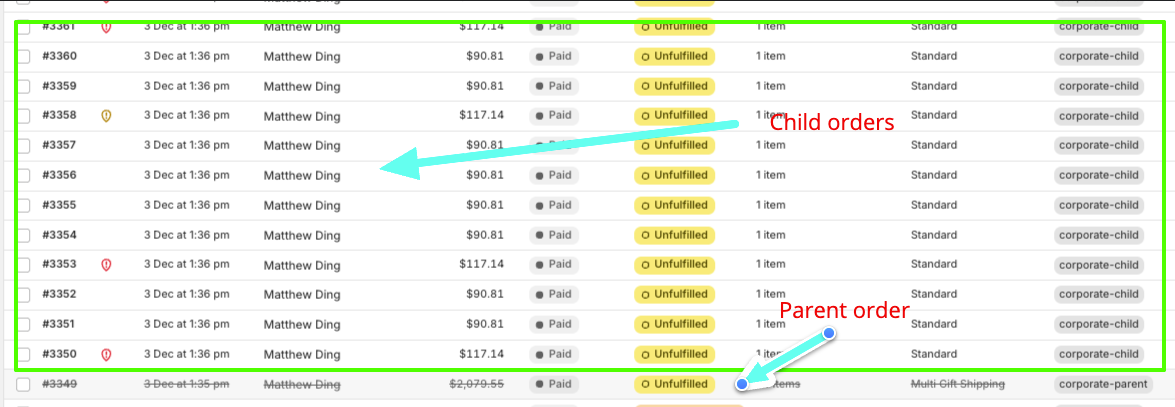
Save it as a new report. Do the same for any other revenue reports you use.
If you also use a custom order tag
You can also filter on your own main-order tag, set in Your own tag on the main (parent) order under Settings → Multi Gifts → Settings → Order tags. For double counting you don't need to: GNMG-Parent already covers it.
What to tell your finance team
- The main order holds the payment only. Leave it out by filtering on
GNMG-Parent. - The recipient orders hold the revenue for each gift. Keep them.
- Use the filtered report as your Multi Gift revenue figure.
- An Order Fee (set on the storefront's Pricing tab) is charged on the main order only, so a report that leaves out the main order also leaves out that fee. A Message Fee is copied to each recipient order.
- Fulfil and ship the recipient orders, which hold the stock. Every order in a multi gift shares one family code tag, so your 3PL or ERP can link recipient orders back to the main order.
Need help? Chat with us using the chat button in the help centre or in the app, or email support@giftnote.com.
Related articles
Was this helpful?
Still need help? Share an idea