Export Gift Cards and Liability Reports in Giftnote
Written By Giftnote Admin
Last updated About 10 hours ago
Heads up — Giftnote v3 is here and the app looks different. We have just launched a completely new interface, so some screenshots and menu names in this article are still from the old version. We are updating the help docs over the next few days. In the meantime, if you get stuck, email support@giftnote.com and we will help you out.
Giftnote Gift Card Exports
Giftnote offers an easy way to create exports of your gift cards and generate liability reports for reconciliation and financial tracking purposes. This step-by-step guide will walk you through the process of exporting gift card data and liability reports.
Why Export Gift Card and Liability Reports?
Exporting gift card and liability reports is crucial for managing your finances and ensuring accurate reconciliation. These exports provide detailed information about issued gift cards, their balances, and potential liabilities, helping you stay on top of your financial obligations.
Step 1: Navigate to Settings
- Log in to your Giftnote account.
- Go to the dashboard and locate the Settings section.
Step 2: Manage Exports
- Once in Settings, look for an option labeled Manage Exports. This section is where you can handle all data exports related to gift cards and liabilities.

Step 3: Create a New Export
- Click on the ‘Create’ button located at the top right corner of the screen.
- A dropdown menu will appear, providing different export options.
- Select the type of export you need:
- Gift Card Export: Choose this if you want a detailed list of all issued gift cards, including their current balances and statuses.
- Liability Report: Choose this option to get a report detailing the outstanding liabilities associated with issued gift cards. This report is essential for financial accounting and tracking unredeemed balances.
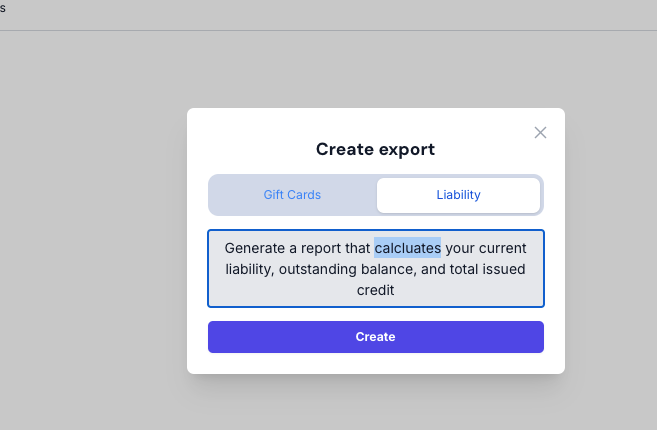
Step 4: Process the Export
- After selecting the desired export type, click Create.
- The system will begin processing your request, generating a file that compiles all relevant data.
Step 5: Export as CSV
- Once the export file is ready, it will be available for download.
- You can export this file as a CSV (Comma-Separated Values) format, which is commonly used for importing into spreadsheets or accounting software.
- Download the CSV file to your computer for further use.
Tips for Using Exported Data
- Review Regularly: Schedule regular reviews of your gift card exports and liability reports to keep your financial records up to date.
- Integrate with Accounting Software: Import the CSV files into your accounting software to streamline reconciliation processes.
- Monitor Outstanding Liabilities: Use the liability reports to track unredeemed gift card balances, which can help in forecasting and managing financial obligations.
By following these steps, you can efficiently manage your gift card exports and liability reporting within Giftnote, ensuring accurate financial tracking and reconciliation. If you have any questions or encounter issues during the export process, please reach out to Giftnote support for assistance.