4. Add Checkout & Post-Purchase Extensions
Collect Gift Messages at Checkout (Shopify Plus) & Allow Adding/Editing on the Order Status Page (All Plans)
Written By Giftnote Team
Last updated About 10 hours ago
Heads up — Giftnote v3 is here and the app looks different. We have just launched a completely new interface, so some screenshots and menu names in this article are still from the old version. We are updating the help docs over the next few days. In the meantime, if you get stuck, email support@giftnote.com and we will help you out.
1. Giftnote Checkout Extension (Shopify Plus Only)
This feature is exclusive to Shopify Plus.
Let customers leave a personalized gift message directly at checkout. No extra steps. Fully native.
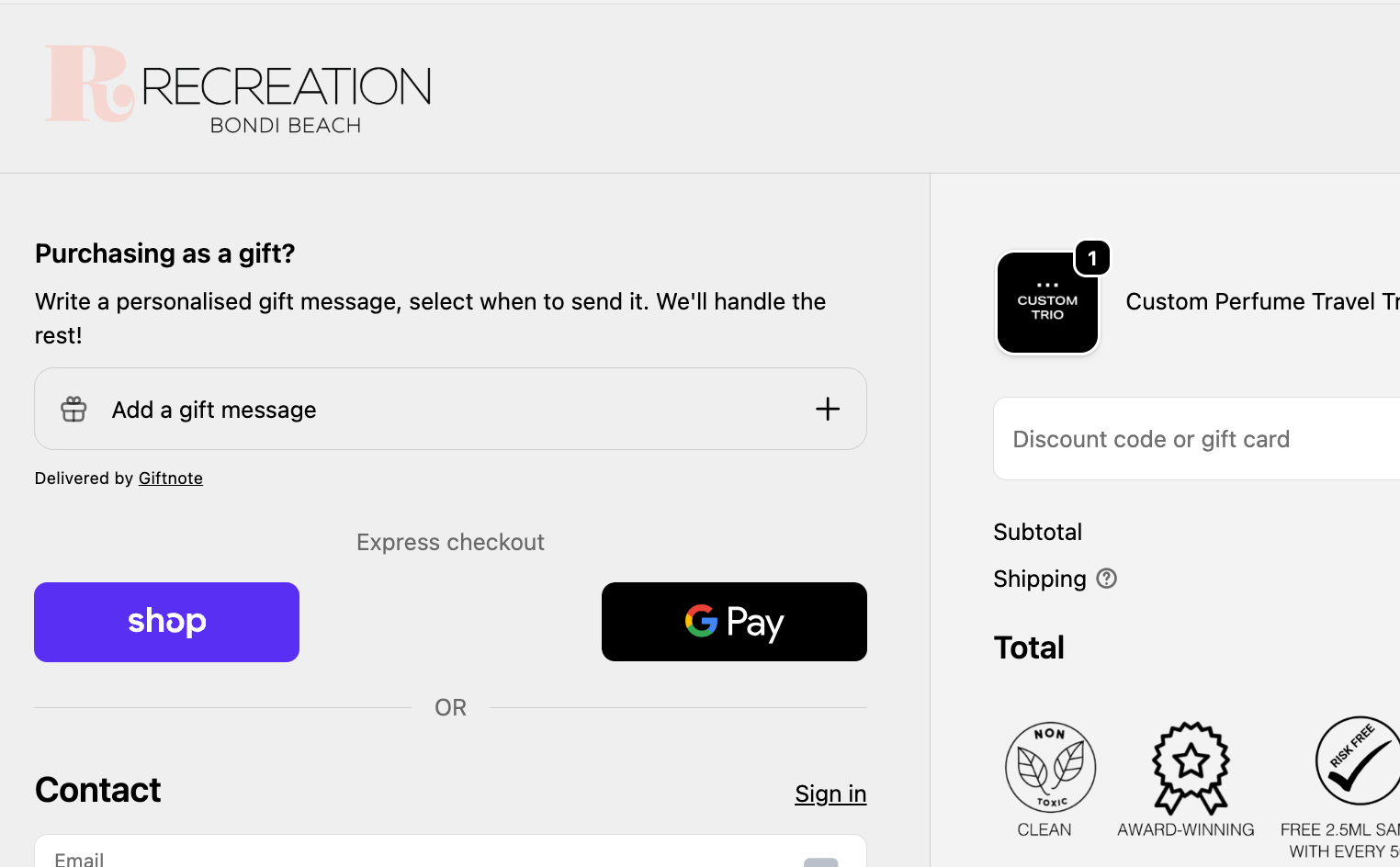
1. Enable the Giftnote Checkout Widget
To activate the widget:
Go to Shopify Admin → Settings → Checkout
Click Customize
In the checkout editor, click “Add app block”
Choose Giftnote Message (v2)
Click Enable block
You can drag the block anywhere on the checkout page.
2. Customize Widget Settings
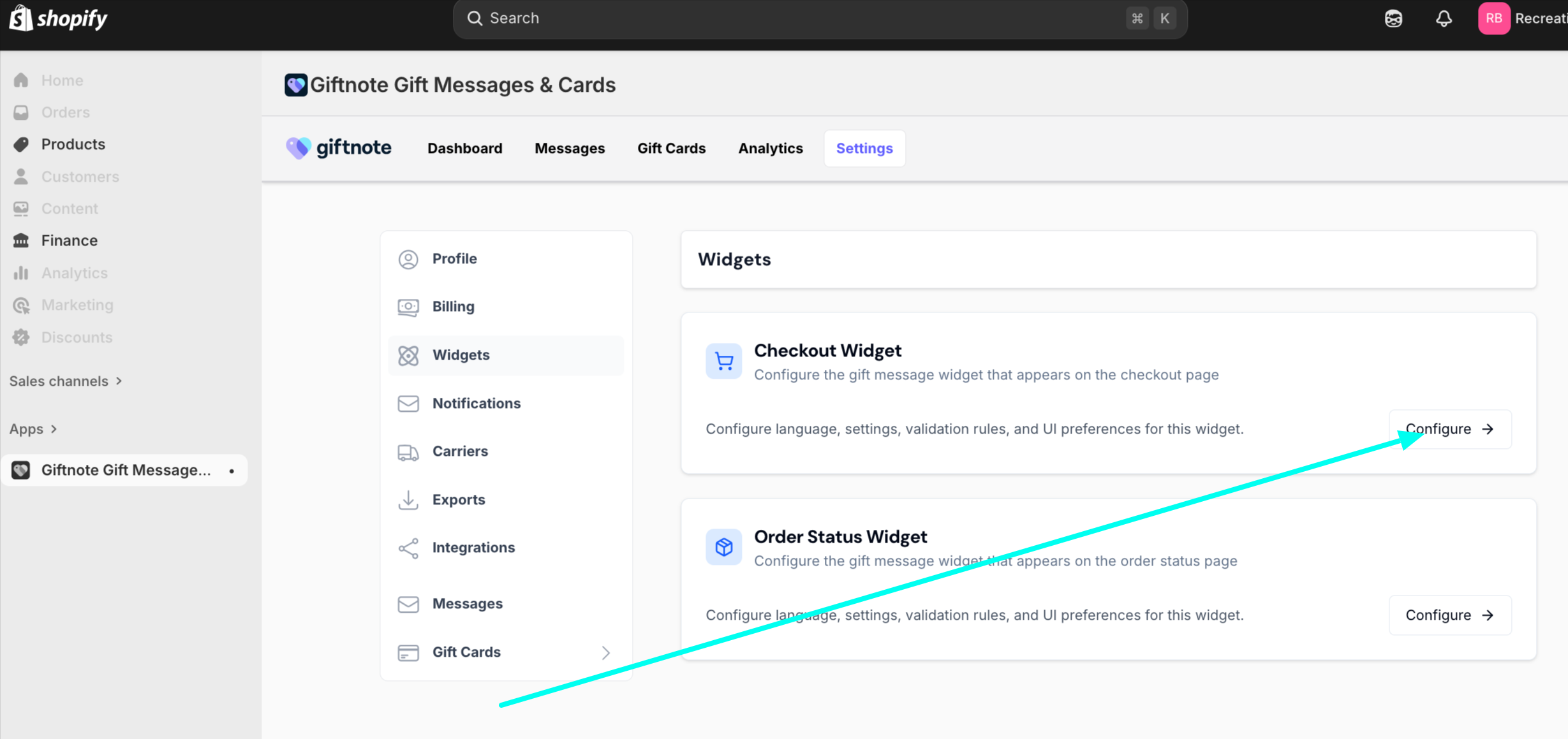
In the Giftnote app:
Go to Settings → Widgets → Checkout Widget
From here, you can control:
Delivery method: Hide or show “on delivery” (optional for digital gifts)
Phone number field: Optional for SMS delivery
Surcharge product: Upsell a premium gift experience (linked to a Shopify product or variant)
Hidden products: Exclude widget for specific products (e.g. third-party gift cards)
Region control: Show/hide widget by shipping country
3. Optional: Charge for Gift Messages
If you want to monetize the widget:
Create a digital product in Shopify (e.g. “Digital Gift Message”)
Set vendor = Giftnote
Link this product in the widget settings as the surcharge product
You could also use this feature to upsell gift wrapping or additional gifting elements and include the Giftnote message as part of this
This adds a charge to the order when customers choose to send a gift message.
Click here for a more detailed article on the set up
4. Troubleshooting
Not appearing in checkout?
Confirm you're using a Shopify Plus plan
Make sure the Giftnote app embed is enabled
Confirm the block is added to the correct checkout template
Need to hide it for some products?
Use the Hidden products setting in Giftnote → Widget Settings
Notes
Requires Shopify’s Checkout Extensibility
Not compatible with vintage checkout or third-party gift card products
Ideal for brands who want to offer premium gift options natively
2. Enable Gift Messages on the Order Status Page (All Shopify Plans)
Giftnote’s Order Status Page widget lets customers add or edit a gift message after completing checkout, a key feature if they missed it during purchase or changed their mind.
✅ Available to all Shopify merchants — no Plus plan required.
Step 1: Add the Giftnote Widget to the Order Status Page
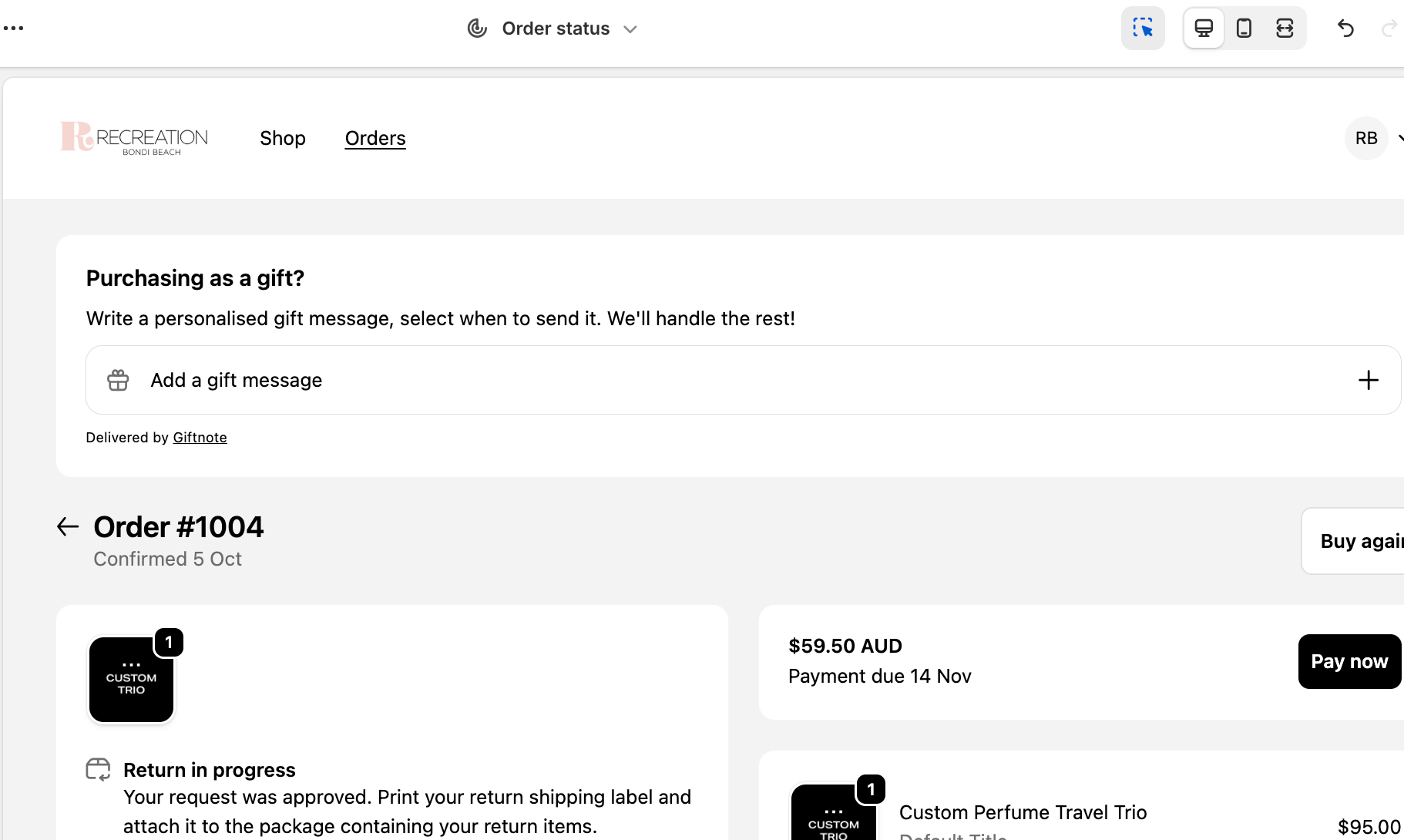
In Shopify Admin, go to Settings → Checkout
Click Customize
In the editor, toggle the view to "Order Status Page" at the top
Click Add App Block, then select Giftnote Message
Place the block where you want it to appear
Click Save
You can drag it above or below existing blocks for optimal visibility.
Customers will now:
Add a gift message if they didn’t earlier
Edit their message before it’s sent
All from the Order Status (Thank You) Page
Step 2: Configure Widget Settings in Giftnote
To customize what the widget displays:
In Shopify Admin, go to Apps → Giftnote
Click Settings → Widgets → Order Status Widget
Adjust the following options:
Delivery method default (email or SMS)
Hide "on delivery" method (optional)
Hide phone number field (optional)
Exclude widget for specific products
Customize copy/language
Click Save once done.
⚠️ After saving, refresh the Checkout Editor in Shopify to see your updates applied live.
Step 4: Add a Link to the Shopify Order Confirmation Email
To drive post-purchase engagement, add a direct link to let customers add or update their gift message from the confirmation email.
In Shopify:
Go to Settings → Notifications
Edit the Order Confirmation and/or Shipping Confirmation emails
Paste the following snippet wherever it fits best (you can add custom styling):
{% comment %} Gift Message Email Block for Shopify Order Confirmation Emails {% endcomment %} <br> {% assign giftnote_attribute_count = 0 %} {% for attribute in order.attributes %} {% if attribute.first contains 'giftnote_' %} {% increment giftnote_attribute_count %} {% endif %} {% endfor %} <h4 style="margin-top: 20px;"> {% if giftnote_attribute_count > 1 %} Your gift purchase 🎁 {% else %} Purchasing as a gift? 🎁 {% endif %} </h4> <a href="{{ order.order_status_url }}"> {% if giftnote_attribute_count > 1 %} View and edit your gift message {% else %} Add a gift message to your order {% endif %} </a> {% comment %} Gift Message Email Block for Shopify Order Confirmation Emails {% endcomment %} You can change the text to suit your tone or branding.
Reach out to support@giftnote.com if you need help with this
Metafields vs Order Attributes
Giftnote now uses Shopify Metafields, not order attributes. This:
Keeps your order data cleaner
Supports better integration with Klaviyo, Shopify Flow, and other apps
Still need order attributes for internal workflows?
→ Toggle them back on in Giftnote → Settings → Widgets
Use Cases for Order Status Gifting
A customer forgets to include a gift message at checkout
Someone realises post-purchase they sent the gift to a recipient
You want to boost participation in gifting without disrupting purchase flow
reduce customer support enquiries