Adding Recipient Details to Gift Cards in Shopify and Setting an Expiry Date
Written By Giftnote Admin
Last updated About 10 hours ago
Heads up — Giftnote v3 is here and the app looks different. We have just launched a completely new interface, so some screenshots and menu names in this article are still from the old version. We are updating the help docs over the next few days. In the meantime, if you get stuck, email support@giftnote.com and we will help you out.
By default, Shopify does not add recipient details to gift cards created using third-party platforms like Giftnote. However, you can now configure Shopify to include these details. Follow the steps below to add recipient information and set expiry dates for your gift cards.
Viewing Gift Card Details in Shopify
- Navigate to the Gift Card Section: Go to Shopify > Products > Gift Cards.
- Check Existing Gift Cards: You'll notice that historical gift cards do not have recipient details, unless you're using Shopify's native gift card function.
Adding Recipient Details to Gift Cards
Giftnote provides a feature to include recipient details in gift cards. To enable this feature:
- Go to Giftnote Settings:
- In your Shopify admin, navigate to Shopify > Settings > Apps and sales channels.
- Select Giftnote from the list of installed apps.
- Enable Recipient Details:
- Look for the option labeled 'Attach recipient to gift cards in Shopify'.
- Toggle this switch to enable the feature.
- Customer Profiles: Once enabled, customer profiles will be created for recipients in Shopify, enhancing your customer management capabilities.

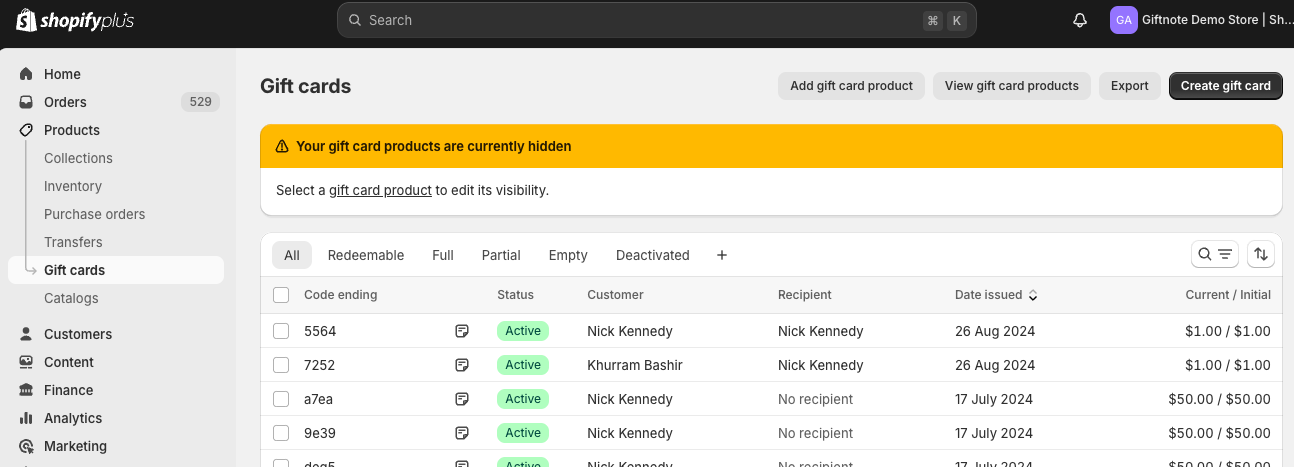
You'll notice in the top two examples below that they now include the recipient details after making the change described above.
Setting an Expiry Date for Gift Cards
By default, Shopify gift cards do not have an expiry date. You can set a custom expiry date through Giftnote:
- Default Expiry Setting:
- In the same Giftnote settings menu where you enabled recipient details, find the Default expiry option.
- Enter the desired expiry period (use '0' for no expiry).
- Save Changes: Click the Save button to apply your settings.

Our email integrations (Klaviyo, Yotpo, Iterable) now support events for the gift card expiry date. This allows you to include expiry information in your email templates and even send automated reminders to customers to use their gift cards before they expire.
Important Legal Considerations
- Compliance with Local Laws: It's crucial to verify the rules and regulations for the countries where your store operates. Some regions have specific laws regarding gift card expiry, making it illegal for gift cards to expire before a certain period. Ensure your settings comply with these regulations to avoid legal issues.
By following these steps, you can effectively manage gift cards in Shopify, ensuring that recipient details are captured and legal compliance is maintained. For further assistance, refer to the Giftnote support documentation or contact your account manager.