7. Addressless gifting: let recipients add their own address
Let Multi Gift buyers send gifts with just names and emails. Each recipient claims their gift, verifies with a one-time code and enters their own shipping address.
Written By Giftnote Team
Last updated 25 days ago
On the free plan or Core? Multi Gift needs the Professional plan. Choose a plan in Settings > Subscription in the app, or email support@giftnote.com and we'll help you choose. Which plan do I need?
Addressless gifting lets a Multi Gift buyer send gifts without knowing where everyone lives. They add each recipient's name and email, and each recipient enters their own shipping address. It's new in our September 2026 update.
It suits companies gifting staff, clients or event guests whose home addresses they don't have.
Addressless gifting is in beta. It works on real orders, but some parts are still being built and how it behaves may change. Shipping costs, tax and refunds work differently from a normal order, so read How orders, shipping and payments work below before you offer it to customers. Run one test order end to end first, and check the tax and accounting points with your accountant. We're building it with the merchants using it, so please send us your feedback as you go.
Watch a quick explainer:
Can't see the video? Watch it on Loom.
Before you start
- You need Multi Gift, which is on the Professional plan, and at least one storefront. See Set up Multi Gift.
- Addressless gifting is an early access feature. You switch it on in each storefront's Settings tab, under Ordering. If you don't see Addressless gifting there, chat with us and we'll switch it on.
- The storefront needs at least one shipping rate under Fixed Shipping Rates on its Shipping tab. There's no address at checkout, so live Shopify rates can't be used while addressless gifting is on.
Turn it on for a storefront
- In Giftnote, go to Settings → Multi Gifts.
- Find the storefront and click Edit.
- Open the Settings tab.
- Under Ordering, turn on Addressless gifting ("Let buyers send a gift with only an email"). Save if a save bar appears.
- Back in Settings → Multi Gifts, set Days to claim and choose whether to send the final invoice and refund unclaimed gifts automatically (see below).
- Set up the claim notifications (see below) before you take a real order.
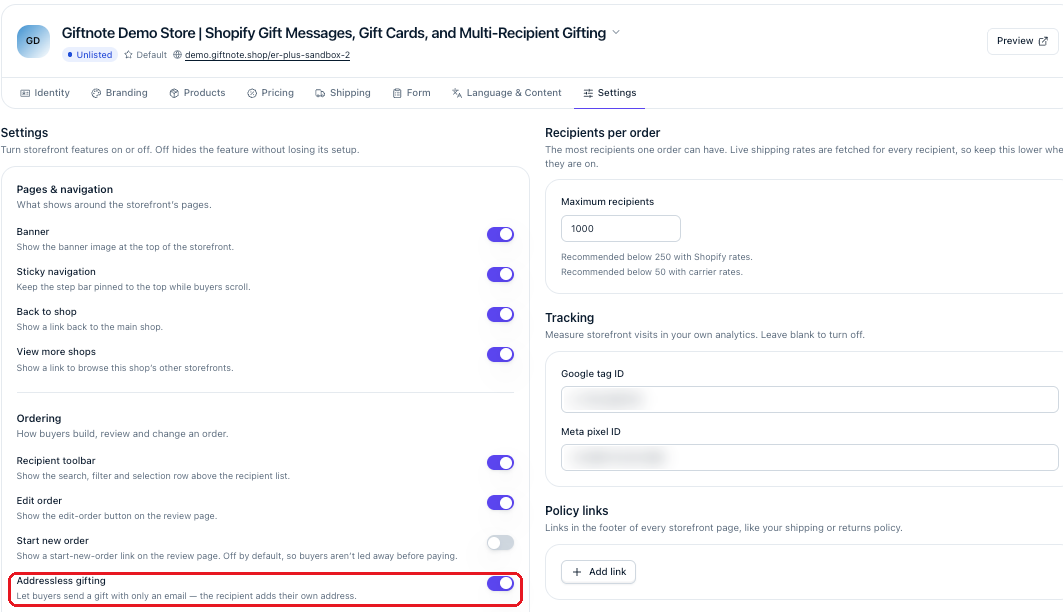
It only affects that storefront. With it off, the buyer has to enter an address for every recipient who gets a parcel. The app suggests trying it on a test storefront first and running one order end to end before you use it for real orders.
See it as your customers will. Walk through the buyer's side on our demo storefront: er-plus-sandbox-2.giftnote.shop/r. Add a product, then pick Send as an e-gift at step 2.
Claim time, final invoice and refunds
These settings apply to every storefront. Find them in Giftnote under Settings → Multi Gifts, in the Addressless gifting section. They decide what happens between checkout and the last claim.
- Days to claim: how long claim links stay open, from 1 to 90 days. The default is 30. When the time runs out, unclaimed links expire and the final invoice covers only the gifts that were claimed.
- Send the final invoice automatically: once everyone has claimed, or the claim time runs out, Giftnote emails the buyer a link to pay the shipping and tax added to their order. With it off, Giftnote doesn't send that email, so you follow up the payment with the buyer yourself.
- Refund unclaimed gifts automatically: when the claim time runs out, gifts nobody claimed are refunded to the buyer's card and noted on the order as "unclaimed gifts". With it off, you refund unclaimed gifts yourself in Shopify.
Example: a buyer sends 100 gifts with a 30-day claim window and both options on. 99 people claim and their gifts ship as they claim. On day 30, the last gift is refunded to the buyer's card, and the buyer gets one email to pay the shipping and tax for the 99 real addresses.
The flow: what buyers and recipients see
The buyer
- Adds products on your storefront as usual.
- Chooses Send as an e-gift at step 2, under Delivery. The choice applies to every recipient in the order. A buyer can't send some recipients an e-gift and ship others to an address in the same order; they'd place two orders.
- Adds the gift note using your normal options, such as a printed card or a digital message.
- Adds recipients one at a time or by CSV upload. Only a name and a valid email are needed; there are no address fields or columns.
- Checks out and pays for the gifts, with shipping at your storefront's fixed rate, because no addresses exist yet.
- Pays the final invoice once everyone has claimed or the claim time runs out. It covers any shipping and tax the real addresses add, on the same order.
Each recipient
- Gets an email telling them they have a gift waiting, with a link to claim it (the Multi Gift - Claim Request notification, which you can customise).
- Opens the link and verifies it's them with a one-time code we email them (the Multi Gift - Claim OTP notification).
- Enters their shipping address and confirms, before the claim time runs out.
- Receives their gift, with the gift message the buyer chose. Each gift ships as soon as that recipient claims.
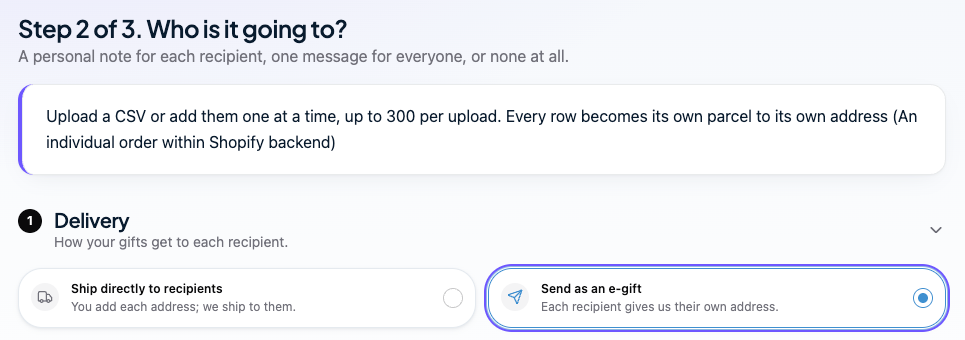
Giftnote only fulfils a recipient's gift once they've added their address.
What you see in Giftnote
Open the order under Multi Gifts, then open a recipient. Until they claim, the recipient shows No address and the Claim Link card says Awaiting address.
If a recipient can't find their invite, click Copy claim link and send them the link yourself. They use it to submit their shipping address.
Set up the claim notifications
Recipients only hear about their gift through Giftnote's notifications, so check them before your first order. Addressless gifting uses two:
- Multi Gift - Claim Request: the invite that tells the recipient they have a gift and links them to the claim page. This is the email most likely to be mistaken for spam, so make it clear who the gift is from and why they're getting it.
- Multi Gift - Claim OTP: the one-time code the recipient enters to prove it's them.
To customise them, go to Settings → Notifications and open each one. You can change the wording and branding to match your store. Send yourself a test order to see both emails as a recipient would.
How orders, shipping and payments work
These answers describe the beta as it works today. We'll update this article as things change.
Shipping
- The buyer pays a fixed shipping rate at checkout. It comes from your storefront's fixed rates, because there's no address to quote live rates against.
- The real shipping is settled on the final invoice. Once everyone has claimed, or the claim time runs out, Giftnote updates the original order with the shipping for the real addresses. The buyer pays the difference on that same order.
- Gifts ship as each recipient claims. You don't wait for the final invoice to fulfil.
- Check addresses before you ship. Recipients can currently enter any address, including places you don't deliver to. If a recipient's address is outside your shipping zones, contact the buyer and refund that gift yourself.
Orders and stock
- The buyer's payment creates one main order. Each recipient's own Shopify order is only created once they add their address.
- The main order holds the stock for the whole gift from the moment checkout is completed. Recipient orders never take stock again, so nothing is counted twice.
- Stock can be held while the main order is unpaid, so it can't sell out from under a buyer mid-checkout. Choose Off, 7, 14 or 30 days, or a custom window, under Main order in Settings → Multi Gifts. After that window, unpaid stock goes back to your store.
- Recipient orders use a Giftnote email instead of the buyer's email, so the buyer doesn't get a Shopify shipping email for every recipient. The main order keeps the buyer's real email. Search the order's Multi Gift tag in Shopify to see all its orders together.
Payments, tax and accounting
- Revenue for the gifts is taken when the buyer pays, before any recipient has claimed. Some gifts may not ship for weeks. Extra shipping and tax arrive later, on the same order, through the final invoice.
- Tax is settled on the final invoice. At checkout there's no recipient address, so the buyer pays for the gifts and the fixed shipping rate first. Once everyone has claimed, or the claim time runs out, Giftnote adds the tax for the real addresses to the original order and the buyer pays the difference. If the buyer never pays it, follow it up with them yourself. This part of the beta is new, so check your first few orders and ask your accountant how to record it.
- Unclaimed gifts can be refunded automatically to the buyer's card when the claim time runs out. Turn on Refund unclaimed gifts automatically.
- Other refunds and cancellations are manual. Cancelling or refunding after payment is done by you in Shopify. There's no way yet to cancel the main order and all its recipient orders together. Refund to the card the buyer paid with.
Recipients and claims
- Claim invites go by email only. A recipient with only a phone number can't claim. SMS invites aren't available.
- Claim links expire after the days you set, from 1 to 90 days (30 by default).
- The buyer doesn't get reminder emails. They can see who has claimed on the order page. You can also copy a claim link and send it yourself.
- Recipients can't decline, swap or donate a gift yet.
- The buyer can see each recipient's address once it's been added. If your customers send to people who'd expect that to stay private, tell us.
FAQ
Can buyers still enter addresses themselves on the same storefront?
Yes. With addressless gifting on, the buyer chooses at step 2 of each order: Ship directly to recipients (they enter every address) or Send as an e-gift (recipients add their own). It's one or the other per order.
Can I use live UPS or Shopify shipping rates?
Not at checkout. There's no address to quote against, so the buyer pays one of your storefront's fixed rates. The real shipping for each address is added to the order on the final invoice.
Who covers the difference if shipping costs more than the buyer paid?
The buyer. Once everyone has claimed, or the claim time runs out, Giftnote updates the order with the shipping and tax for the real addresses and the buyer pays the difference on that same order.
What if a recipient enters an address I don't ship to?
The claim goes through today, so check addresses before you fulfil. Contact the buyer and refund that gift in Shopify if you can't send it. Limiting addresses to your shipping zones is coming.
When do I get paid, and when does the revenue count?
The buyer pays for the gifts and the fixed shipping rate at checkout, so most of the revenue lands then, on the main order. Recipient orders appear in Shopify later, as people claim. Any extra shipping and tax comes in on the same order when the buyer pays the final invoice.
How is tax handled?
In two steps on the same order. The buyer pays for the gifts and shipping at checkout, before any address is known. Once everyone has claimed, or the claim time runs out, Giftnote adds the tax for the real addresses and the buyer pays the difference. You don't need to wait for that payment to ship. Talk to your accountant about how to record it.
When is stock reserved?
While the order waits to be paid, Giftnote can hold its stock for the window you choose (Off, 7, 14 or 30 days, or custom). Once the buyer pays, the main order holds the stock for every recipient, and recipient orders don't take it again.
Where do recipient orders show up in Shopify?
Each recipient gets their own Shopify order once they've added their address. These orders use a Giftnote email instead of the buyer's, so the buyer isn't sent a shipping email per recipient and isn't added to your marketing from them. The main order keeps the buyer's real email. Search the order's Multi Gift tag to see them all together.
What happens if a recipient never claims?
Their claim link expires after the days you set. With Refund unclaimed gifts automatically on, the gift is refunded to the buyer's card and noted on the order as "unclaimed gifts". With it off, refund the buyer in Shopify yourself. Either way, the final invoice only covers gifts that were claimed.
A recipient can't find their invite. What do I do?
Open the order, open the recipient and click Copy claim link, then send it to them yourself.
Can I cancel a whole e-gift order at once?
Not yet. Cancel or refund the main order and any recipient orders separately in Shopify.
Does the buyer get updates as people claim?
No, to avoid flooding them with emails. They can check who has claimed on their order page. They get one email at the end with the final invoice, if you've turned that on.
Can recipients claim with a phone number, or swap or decline the gift?
Not yet. Recipients need an email address, and they can only claim the gift as sent. SMS, swaps and declines are on our list.
What we're building next
We're working on these now. There are no release dates yet, and your feedback decides what comes first.
- Addresses limited to your shipping zones, so recipients can only claim to places you deliver.
- The main order stays open until every recipient has claimed.
Further out, we're looking at SMS invites, a share link the buyer can send to recipients themselves, letting recipients swap or decline a gift, and hiding addresses from the buyer.
Help us shape addressless gifting. You're using it while we build it, so tell us what works and what doesn't: how your customers use it, what they ask you, where it gets in the way of your fulfilment or accounting, and what you'd want next. Chat with us in the app or email support@giftnote.com. We read every reply.
Things to know
- Addressless gifting is for Multi Gift orders only.
- Questions? Chat with us using the chat button in the help centre or in the app, or email support@giftnote.com.
Related articles
Was this helpful?
Still need help? Share an idea