4. Gift cards and store credit
What changed for gift cards and store credit in the September 2026 update: one searchable list, shop-wide expiry, checks before a card sends, and liability exports.
Written By Giftnote Team
Last updated 27 days ago
Gift cards and store credit
Gift cards work the same way for your customers. For you, Gift Cards in the app now holds standard gift cards, gift cards with messages and store credit in one place, and you can search and edit them. You don't need to change anything, but check your expiry setting, which now applies to the whole shop.
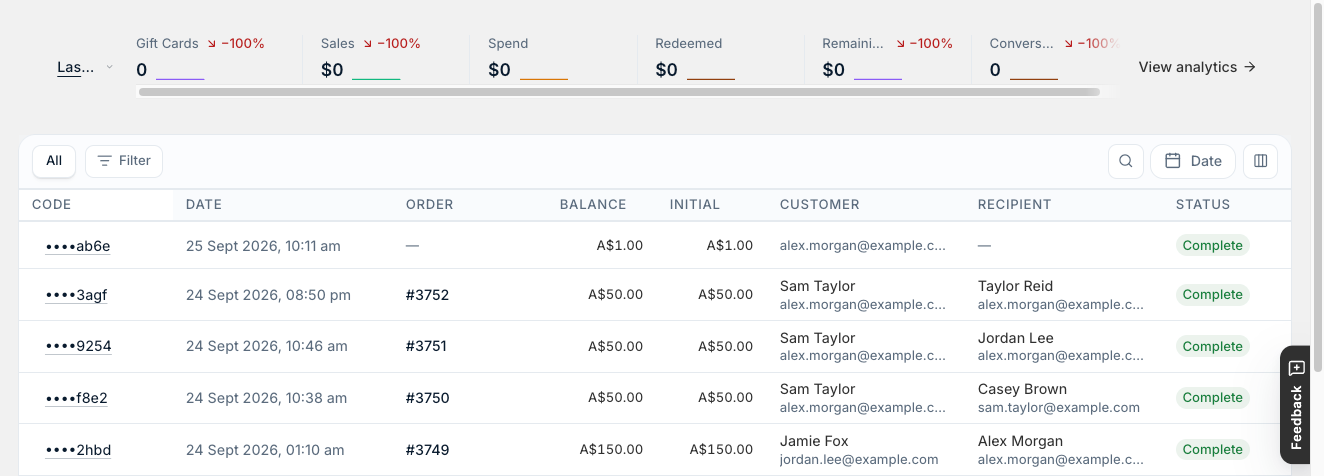
Find any card
Search the Gift Cards list by code, email, phone, name or order number, and filter it.
What you can change
- Expiry. Turn expiry on or off and set it in years, months or days in Settings → Gift Cards → Settings. It applies to every card in your shop, not to single cards.
- Unsent cards. Send a card now, or change its message and delivery time, if it hasn't gone out yet.
- Currencies (new). With Shopify Markets, cards are now issued in the customer's checkout currency, for the price of the variant they picked. See Do Giftnote gift cards work with Shopify Markets? Set fixed gift card prices for each market in Shopify Markets. Otherwise Shopify converts the price and the card ends up with an odd exchange-rate amount. See Set up gift cards for Shopify Markets.
Checked before they send
A gift card only goes out once Shopify confirms its code exists, so customers don't receive a card that doesn't work.
Shopify's fraud assessment for the order shows on the gift card, so you can spot a risky order before anything is delivered. Giftnote issues the card once Shopify allows the purchase. If the order is cancelled, by you or by your fraud tools, Giftnote archives the card. The public balance checker limits how often someone can try a code, which stops people guessing codes.
Send Now gift cards wait 15 minutes before they go out, counted from when payment is received. If a fraud app holds payment until the buyer is approved, the 15 minutes starts after approval.
In step with Shopify
The gift card's status shows on the Shopify order it came from. Turn on Automatically fulfill gift card orders in Settings → Gift Cards → Settings and Giftnote marks the order fulfilled once the card is ready.
History and exports
Each gift card keeps its own history. For your accounts, download a liability export from Settings → Exports. It shows balances at the moment you run it, not over a date range.
Related articles
Was this helpful?
Still need help? Share an idea