15. Gift card reporting and accounting setup
How to set up gift card accounting and reporting in Shopify, including product filtering and A2X mapping for deferred revenue.
Written By Nick Kennedy
Last updated 22 days ago
On the free plan? This feature needs the Core or Professional plan. Choose a plan in Settings > Subscription in the app, or email support@giftnote.com and we'll help you choose. Which plan do I need?
When a customer buys a Giftnote gift card, Shopify records it as a normal product sale, not as gift card liability. If you treat gift card sales as money owed until the card is spent, here's how to map them correctly in your accounts and filter them in Shopify reports.
How Giftnote gift cards work
Giftnote sells a gift card as a product, then issues a real Shopify gift card through Shopify's Gift Card API. Selling it as a product is what lets Giftnote offer custom amounts, branded gift card emails through Klaviyo, SMS delivery and bulk corporate gifting.
In Shopify, Analytics → Reports → Finances → Liabilities shows issued cards under Issued value, and spending a card reduces that balance as normal.
The purchase itself is a product sale, so Shopify puts it in your sales reports rather than recording it as a gift card sale. Most businesses treat a gift card purchase as deferred revenue (money you've taken for goods you haven't supplied yet). To do that, map the purchase to a gift card liability account in your accounting system, as below.
This isn't accounting advice. Gift card rules vary by country, so confirm this approach with your accountant or bookkeeper.
A worked example
Say you sell a $100 gift card. Most countries treat that $100 as deferred revenue: a liability, not a sale. You've taken the money, and you now owe $100 of goods.
The recipient later spends $80 of it:
Your gift card liability drops from $100 to $20
You record $80 as sales revenue at that point
The remaining $20 stays on the books as a liability until it's spent or written off
The revenue comes when the card is spent, not when it's bought. Mapping the purchase to a liability account makes your books work that way.
Setting this up in A2X (Xero and QuickBooks)
A2X handles this with Product Type Grouping. You group the Giftnote gift card SKU (the product code on each variant) as its own product type, then map that line to a gift card liability account.
In A2X, go to Settings → Product Types and create a product type, for example "Gift Cards". Add your Giftnote gift card SKUs, or use a regex pattern to match them.
Go to Settings → Sales Grouping and Tracking and turn on Group by Product Type.
In your account mapping, point the gift card line to your Gift Card Liability account.
This doesn't add anything to your data. It maps the existing line to the right account.
Need your SKUs? Chat with us and we'll send the gift card SKUs for each of your stores.
Reporting inside Shopify
You can filter Shopify sales reports by product, product type or vendor to get a sales figure without gift card purchases.
Giftnote treats products with the vendor Giftnote Gift Card as gift cards, so you can filter by that vendor. To check which products those are, go to Settings > Gift Cards > Products in the Giftnote app.
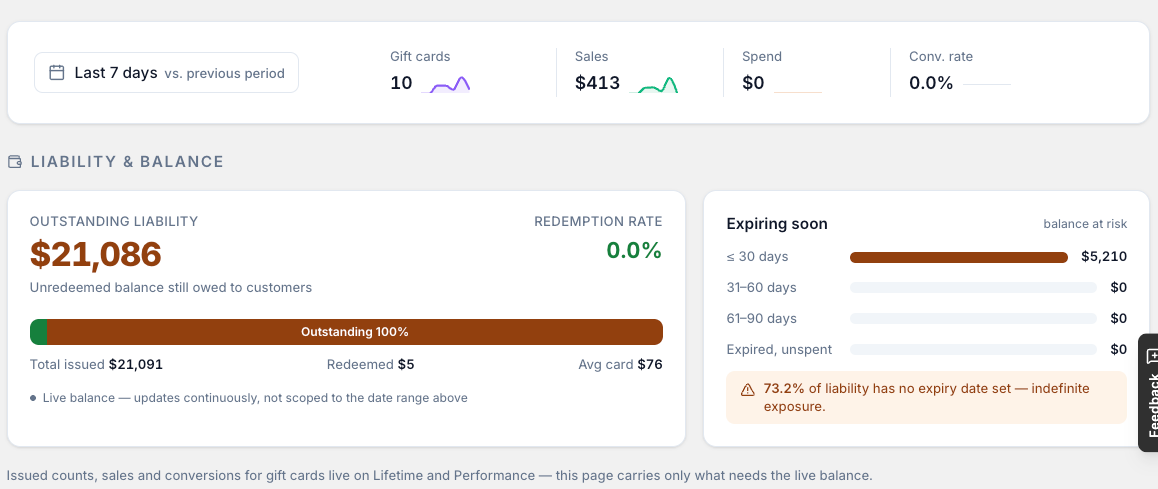
Inside Giftnote, Settings > Exports > Liability Report gives your accountant a snapshot of outstanding gift card balances, and Analytics > Gift Cards shows your live outstanding liability. See Export Gift Cards and Liability Reports in Giftnote.
Reviewing earlier periods
If you've sold Giftnote gift cards for a while and want to correct earlier periods, chat with us. We'll send a gift card report per store, broken down by month, so your accountant can fix it in a single journal.
Further reading
Rules differ by country. Your accountant is the right source, but these are good starting points:
Australia: ATO guidance on vouchers and GST
United Kingdom: HMRC guidance on face-value vouchers
Canada: Financial Consumer Agency of Canada, gift cards
United States: GAAP treatment of gift cards (ASC 606), including breakage
Roadmap
We've asked Shopify's gift card team to let apps issue gift cards that count as gift card sales. We'll update this article when there's news.
Related articles
Was this helpful?
Still need help? Share an idea