7. Analytics and conversions
Analytics in Giftnote: the Overview page and its eight reports, including Performance, Moments, Conversions, Cohort, Products, Gift Cards, Multi Gifts and Uplift.
Written By Giftnote Team
Last updated 17 days ago
Analytics and conversions
Analytics now lives inside the Giftnote app and shows only your store's data. There's nothing to set up: open Analytics from the Giftnote pages in your Shopify sidebar, or select Open analytics on Home.
The report pages
Analytics opens on an Overview page covering everything since you installed Giftnote, and the last 30 days against the 30 before. Its report cards lead to eight reports: Performance, Moments, Conversions, Cohort, Products, Gift cards, Multi Gifts and Uplift.
- Performance: gifts, sales, spend and conversions over a period, compared with the period before.
- Cohort: how each month's gifts keep converting over time, shown as conversions, conversion rate, conversion sales, return on spend or cost per customer.
- Uplift: what a gift order is worth compared with a regular order.
- Products: your most-gifted products, with their sales, spend and conversions.
Fast to load
Giftnote works the numbers out in advance, so reports load straight away instead of calculating each time you open them.
Conversions
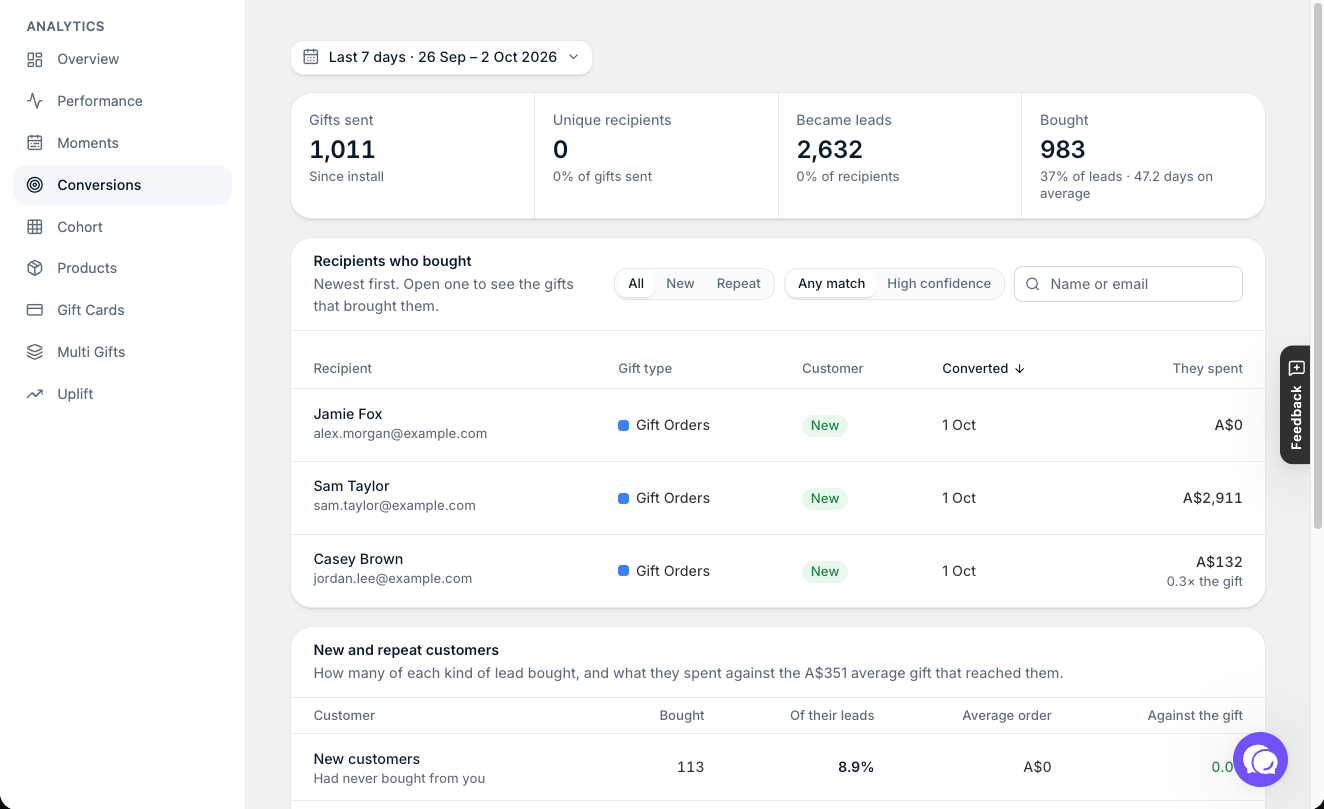
When a gift recipient later buys from your store, Giftnote links that purchase back to the gift. The Conversions page shows how many recipients Became leads and how many Bought, with the average days from gift to purchase. Recipients who bought lists each one, newest first. You can show new or repeat customers only, and open one to see the gifts that brought them.
Gift order status names also changed in the update. If you have saved filters or reports that use the old names, see Understanding Your Analytics for the new ones.
Related articles
Was this helpful?
Still need help? Share an idea