5. Klaviyo + Giftnote segments
Six Klaviyo segments built on Giftnote events, from gift recipients to repeat gifters, with email ideas for each.
Written By Giftnote Team
Last updated 20 days ago
A segment is a Klaviyo list that fills itself based on what people do. Once Giftnote sends its events to Klaviyo, you can group the people who received gifts and the people who sent them, then email each group something that fits. This guide walks you through six segments. You can build the same ones in Attentive, Dotdigital or any other email tool you have connected to Giftnote.
Before you start
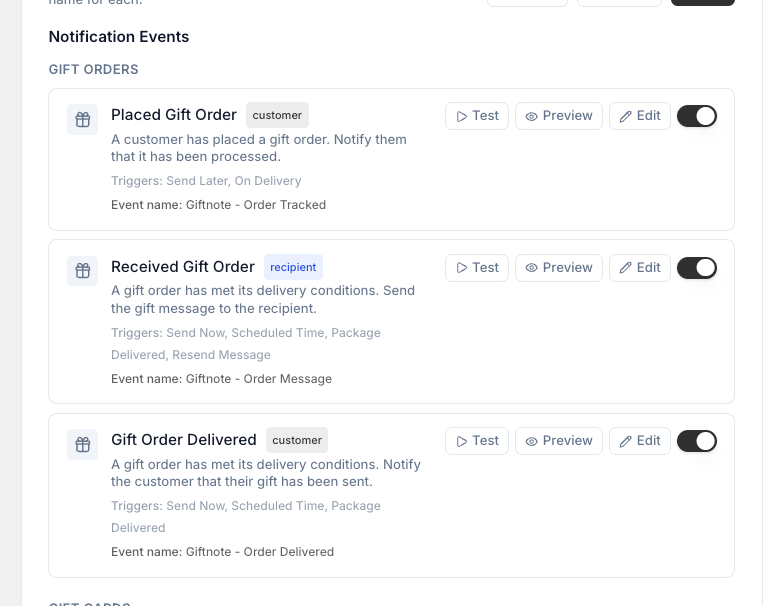
Connect Klaviyo and turn on the Giftnote events. See How to setup Klaviyo.
Where a segment uses a date, use the date you started using Giftnote.
Segment 5 is an estimate. Klaviyo can’t check which of two events happened first inside a segment, so use it as a shortlist and open profiles to confirm.
Event map used in this guide
Check these events show up in your Klaviyo account:
Received Gift Order = recipient event from Giftnote
Placed Gift Order = sender event from Giftnote
Purchased Gift Card = gift card purchase event
Placed Order = Klaviyo’s standard event for any order
Segment 1. Gift Recipients
Name
Gift Recipients
Why
Everyone who received a gift. Your biggest group.
Build in Klaviyo
Create Segment
Condition: Person has Received Gift Order at least once over all time
Save
Email ideas
Recipient welcome that explains how gifting works on your store
Small store credit to trigger first purchase
Three best sellers plus one new arrival
Delivery updates opt in hook to grow consent
Preference capture to personalize follow ups
Segment 2. Gifters
Name
Gifters
Why
People who sent gifts. Good candidates for repeat and corporate gifting.
Build in Klaviyo
Create Segment
Condition: Person has Placed Gift Order at least once over all time
OR: Person has Purchased Gift Card at least once over all time
Save
Email ideas
Schedule your next gift in two clicks
Simple gift bundles for common pairings
Invite them to Multi Gift to send to many addresses at once, if you use it
Remind about seasonal gifting dates
Segment 3. Gift Recipients who have not purchased
Name
Gift Recipients • Not Purchased
Why
Recipients who haven’t bought from you yet. Your best chance to win a new customer.
Build in Klaviyo
Create Segment
Condition: Person has Received Gift Order at least once over all time
AND: Person has Placed Order equals 0 over all time
Save
Email ideas
Store credit with a short expiry
Guided picks email so they choose a style
One click opt in for delivery updates and early access
Social proof block with top reviews
Cart recovery variant that references the gift
Segment 4. Gifters with only one purchase
Name
Gifters • One time Buyers
Why
Gifters who have ordered once. Encourage a second gift.
Build in Klaviyo
Create Segment
Condition: Person has Placed Gift Order at least once over all time
OR: Person has Purchased Gift Card at least once over all time
AND: Person has Placed Order equals 1 over all time
Save
Email ideas
Reminder to schedule the next gift
Pre built gift bundles with free wrap
Add to calendar prompt for last year’s gift date
Small loyalty boost for sending a second gift
Corporate starter pack CTA if the order looked bulk
Segment 5. Gift Recipients who became customers (proxy)
Name
Gift Recipients • Became Customers
Why
An estimate of recipients who bought from you after you started using Giftnote.
Build in Klaviyo
Create Segment
Condition: Person has Received Gift Order at least once over all time
AND: Person has Placed Order at least once after [your Giftnote go live date]
Replace the date with the date you started using Giftnote
Save
Accuracy note
A segment can’t check that the purchase came after the gift. Treat this as a guide and open profiles to confirm.
Email ideas
Cross sell higher AOV collections
Review request that references the gift path
Referral CTA for friends who would love the brand
Early access to seasonal drops
Loyalty invite with a started as a gift perk
Segment 6. Repeat Gifters
Name
Gifters • Repeat
Why
People who have sent more than one gift. Your VIP and corporate buyers.
Build in Klaviyo
Create Segment
Condition: Person has Placed Gift Order greater than 1 over all time
OR: Person has Purchased Gift Card greater than 1 over all time
Save
Email ideas
VIP perks and priority support
Bulk ordering with a CSV upload through Multi Gift, if you use it
Dedicated account manager outreach
Set and forget scheduled gifting
Exclusive bundles for repeat gifters
Grow consent with your Giftnote flows
Gift recipients often haven’t agreed to marketing emails yet. Send them a separate marketing email a few days after the gift that asks them to opt in.
Create a segment: Gift Recipients • No Consent
Has Received Gift Order at least once
Not consented for Email
Not consented for SMS
In your recipient flow, add a split
If they’re in No Consent, send a follow-up with a clear reason to sign up, such as a discount. Keep the sign-up out of the gift email itself, or Klaviyo won't approve it as transactional
If they’ve already opted in, send your normal message
Optional accuracy upgrade for the future
To track exactly which recipients go on to buy, add two small flows that set profile properties:
On Received Gift Order
If Placed Order equals 0
Set
Gifted_NonCustomer = true
On Placed Order
If
Gifted_NonCustomer = trueSet
Converted_From_Gift = trueSet
Gifted_NonCustomer = false
Keep using the segments above in the meantime. Once these flows have run for a while, build a segment on Converted_From_Gift = true for an exact list.
Check your segments
Open ten profiles in each segment and check their events match the segment name
Related articles
Was this helpful?
Still need help? Share an idea