2. How to Set Up Your Custom Gifting Subdomain
Give your Multi Gift storefronts their own web address: claim a free giftnote.shop address or connect your own domain under Settings → Multi Gifts → Settings → Web address.
Written By Giftnote Admin
Last updated 22 days ago
On the free plan or Core? Multi Gift needs the Professional plan. Choose a plan in Settings > Subscription in the app, or email support@giftnote.com and we'll help you choose. Which plan do I need?
Put your storefront on your own web address
Your shop's Multi Gift storefronts can have their own web address, such as gifts.yourbrand.com. In Giftnote, go to Settings → Multi Gifts → Settings and scroll to Web address. The custom domain covers the whole shop, not one storefront. It replaces your default storefront's address, and every other storefront opens at a handle sub-path of it. Under Custom domain, you have two choices:
- Use a free giftnote.shop address, such as
yourstore.giftnote.shop. It goes live automatically, with no DNS setup needed. - Use my own domain, such as gifts.yourbrand.com. You add one DNS record where your domain is managed. The steps below show how.
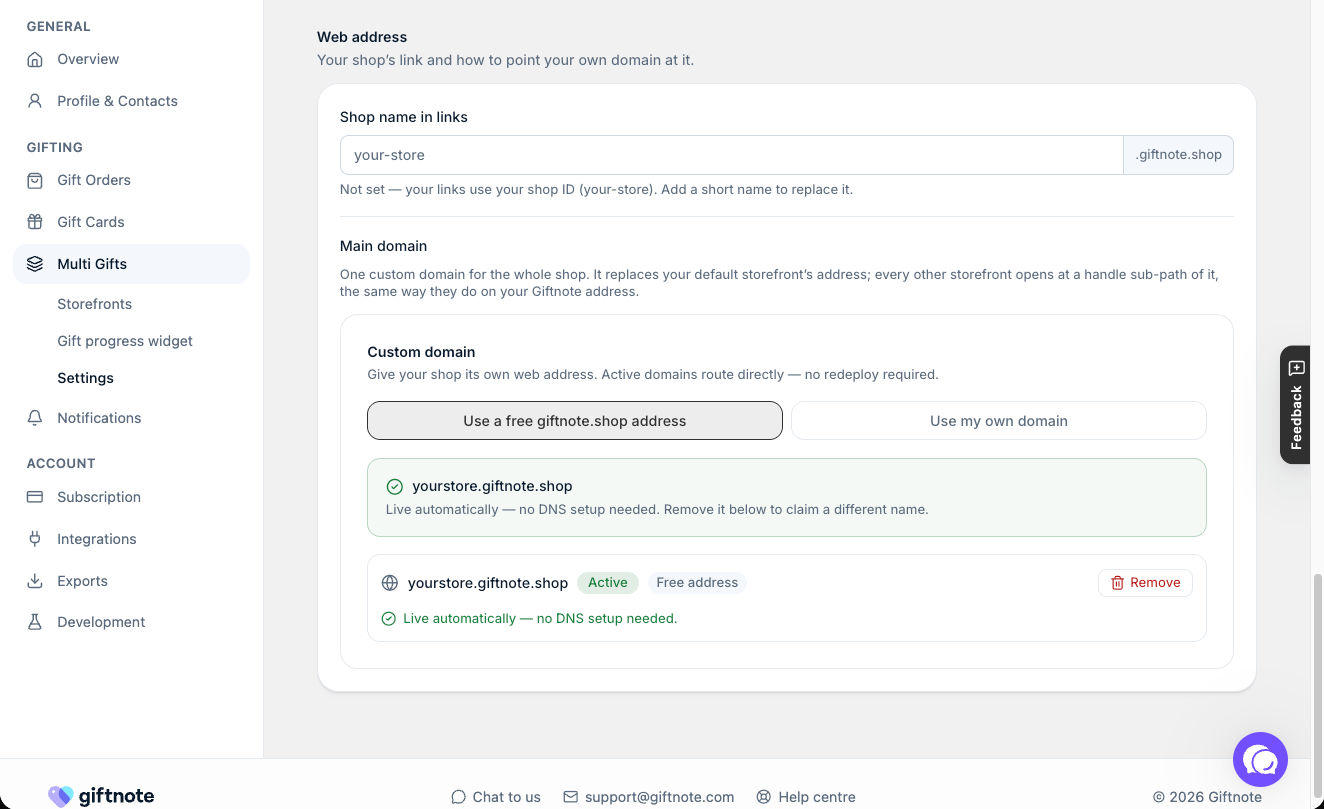
Before you start: choose Use my own domain under Custom domain. Giftnote shows the DNS record to add. (DNS records tell the internet where your domain points.) Keep that page open to copy from. If you don't see a record, chat with us using the chat button in the help centre or in the app, or email support@giftnote.com, and tell us which shop the domain is for.
Step-by-step instructions
- Log in to wherever your domain is managed, for example GoDaddy, Cloudflare or AWS Route 53.
- Open your domain's DNS settings.
- Add a new DNS record:
- Type and Value: copy exactly what Giftnote shows.
- Name:
gifts, or another subdomain you prefer, such asgiftingorshop.
- Save the record. It usually starts working within minutes, but can take up to 48 hours.
- Open your subdomain (for example gifts.yourbrand.com). You should see your default Giftnote storefront.
Notes
- This doesn't change your main website. It only adds a separate address for your gifting storefronts.
- If you use Cloudflare, set the record to DNS-only (not proxied).
- If you're unsure, your IT team or your domain provider's support can help.
If you set this up before September 2026
Your existing record keeps working. If your subdomain points at an old .shop.giftnote.com target, you don't need to change anything.
For a new subdomain, copy the record Giftnote shows. Don't reuse an old .shop.giftnote.com target.
If your subdomain isn't working
- Check the record for typos. One wrong character in the Name or Value is the most common cause.
- Check the Name field. Most DNS providers add your domain automatically, so enter
giftson its own, notgifts.yourbrand.com. - Check Cloudflare proxying. The record must be DNS-only (grey cloud), not proxied.
- Allow for propagation. A new or edited record can take up to 48 hours to work everywhere.
- Seeing a “domain not connected” page? Your DNS reaches Giftnote, but the domain isn't linked to a live storefront yet. Check Custom domain under Settings → Multi Gifts → Settings → Web address, and check the storefront's Visibility on its Identity tab. A Draft storefront is hidden everywhere except the editor.
Final step
Once you've added the DNS record, let us know and we'll check it's working. Chat with us using the chat button in the help centre or in the app, or email support@giftnote.com.
Related articles
Was this helpful?
Still need help? Share an idea